
Why Shared Kiosk Time Clocks Beat Paper Timesheets
By Jack, Product Manager at IDEAblox. Published November 28, 2026.
A shared kiosk time clock is one tablet or computer, left at the front desk, that every employee uses to clock in and out. It beats a paper timesheet for one reason: the time is recorded when the person arrives, not written down from memory later. Everything else in this guide follows from that.
We build IDEAblox Time Clock, and many of the offices that use it run it this way: one shared device at the front desk, where each person picks their name to clock in. Below is how that compares with a clipboard, what the law expects of your records, and how to make the switch.
Paper Timesheets vs a Shared Kiosk Time Clock
| Paper timesheet | Shared kiosk time clock | |
|---|---|---|
| When the time is recorded | Whenever the employee remembers to write it | The moment they clock in or out |
| Who recorded it | Anyone holding the pen | The person who picked their name and entered their own password |
| Adding up hours | By hand, every pay period | Totaled for you |
| Overtime | Found when someone does the math | Split out from regular hours by your rule |
| Fixing a missed entry | Ask the employee, then cross out and initial | A manager adds or corrects the timecard |
| Getting hours to payroll | Retype every sheet into a spreadsheet | Download the pay-period report |
| Finding last year's records | A box of paper | Search by person and date |
| Cost | Paper, plus the hours spent on all of the above | A device you already own, plus a monthly fee |
Where Do Paper Timesheets Go Wrong?
Rarely through dishonesty. A front desk is interrupted all day. Someone walks in to a ringing phone and a waiting visitor, and writes "9:00" on the sheet at 11:30. Someone else leaves in a hurry and fills in the whole week on Friday. By payroll, the sheet is a set of estimates.
The usual problems are ordinary ones:
- A missing start or end time
- The wrong date, or a time with no AM or PM
- Handwriting nobody can read
- Totals added up wrong
- A note such as "stayed late" with no time attached
Each one sends a manager off to find the employee and ask. Then every sheet is typed into a spreadsheet, which is a second chance to get a number wrong.
How Does a Shared Kiosk Time Clock Work?
The details vary by product. This is how it works in IDEAblox Time Clock:
- You set a company ID and a company password. This is one step of the setup when you create your account.
- You sign the shared tablet or computer in once with that ID and password. It runs in the browser, so there is nothing to install.
- Each employee picks their name from the list and enters their own password to clock in or out.
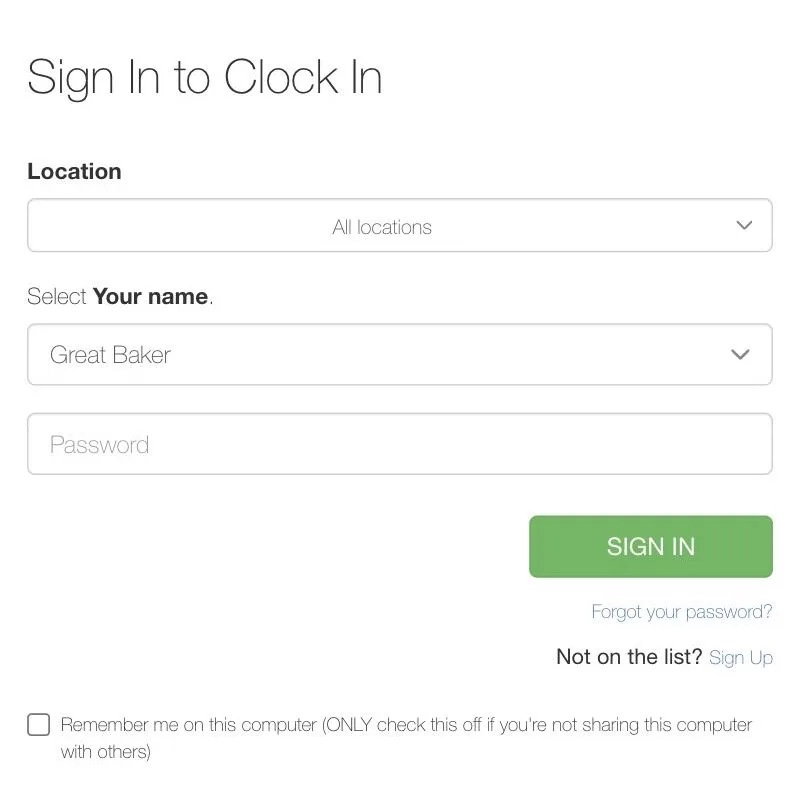
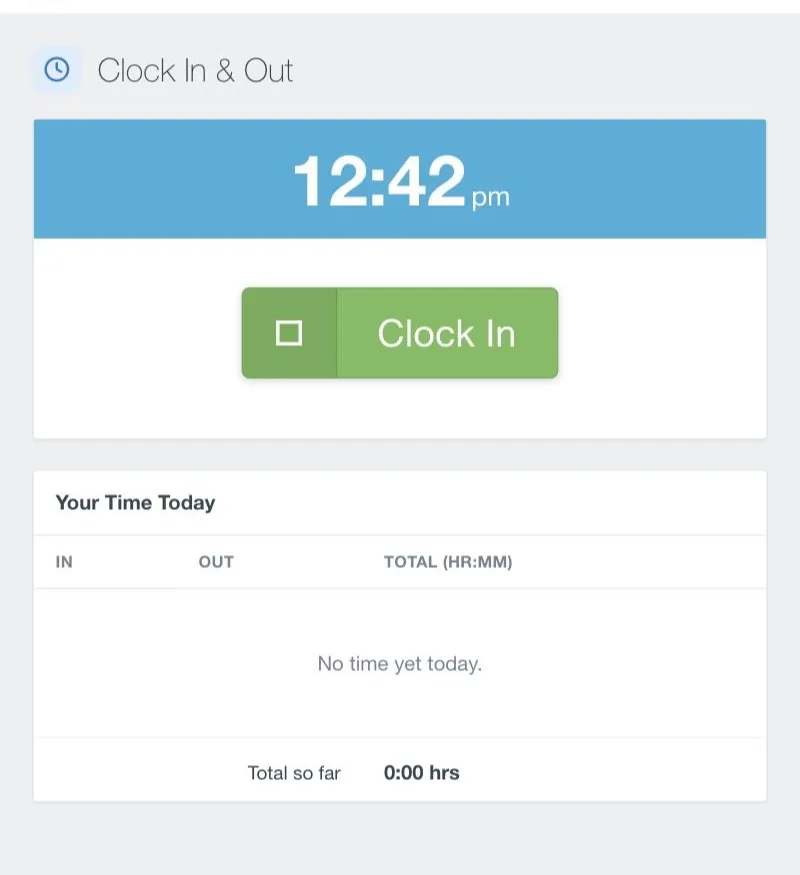
The company password only connects the device to your company. It cannot clock anyone in. That takes the employee's own password, which is what makes it hard for one person to clock in for another. If someone forgets theirs, the kiosk emails them a reset link and shows only a masked version of the address, so the next person at the desk does not see it.
Nobody is tied to the kiosk. The same account works from a phone or any other computer, so someone working off-site for a day can still clock in.
What Does a Manager See?
Every clock-in and clock-out lands in one place as a timecard. Before payroll, a manager reviews and approves the hours, and adds or corrects a timecard for anyone who missed one.
You set your overtime rule once: overtime after so many hours in a day or a week, and double time if you use it. From then on, regular and overtime hours are separated for you. For most hourly employees in the United States, federal law requires overtime pay for hours worked over 40 in a workweek, according to the US Department of Labor. Some states add daily overtime, so check your state's rule.
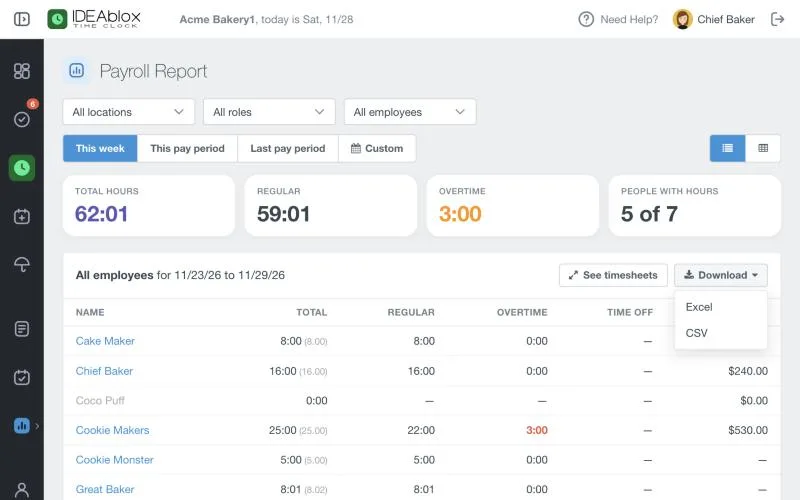
When the pay period ends, the report lists total, regular and overtime hours, time off and pay for each person. You can download it as Excel or CSV. Our guide to doing payroll for a small business covers what happens next.
Is Paper Still Legal?
Yes. The Department of Labor says employers may use any timekeeping method they choose, as long as it is complete and accurate. A clipboard qualifies.
The harder part is keeping the records. Under the Fair Labor Standards Act, payroll records must be kept for at least three years, and the records that wage calculations are based on, time cards included, for two years. See the department's Fact Sheet #21. With paper, that means storing every sheet and being able to find one when asked. With a time clock, the timecards are already filed by person and date.
What Rules Should You Set at the Kiosk?
A kiosk records what people do. It does not decide what they should do. Tell new employees the rules on their first day:
- Clock in when you are ready to start work, not when you walk in the door
- Clock out when you stop, before you pack up
- Use the kiosk for every shift
- Tell a manager about a missed clock-in the same day
- Never clock in or out for someone else
The point is not to watch people. When everyone records time the same way, a conversation about late arrivals starts from a record instead of two different memories. We wrote more about that in how to get employees to be on time.
When Is Paper Good Enough?
If you have one or two employees on fixed hours, and payroll takes you a few minutes, paper is fine. A time clock starts to pay for itself when any of these are true:
- You chase missing or unclear entries most pay periods
- You add up hours or overtime by hand
- Several people cover the same desk on rotating shifts
- You could not quickly find a timesheet from 18 months ago
For the other ways to track time, including spreadsheets and wall clocks, see how to keep track of employee hours.
How Do You Switch From Paper?
- Choose the device and the spot. A tablet or an old laptop works. Put it where people already pass when they arrive, such as the reception desk or the staff entrance.
- Create your company account and add your employees. Each one gets a link to choose their own password.
- Sign the device in with your company ID and password.
- Start at the beginning of a pay period, so one payroll is not split between paper and the kiosk.
- Review the first week's timecards with your team and fix any habits early.
IDEAblox Time Clock is free for 14 days and then costs a flat monthly price by headcount, from $5 a month for up to three people. Start your free trial and set up your front desk kiosk today, or read the help pages first.